|
<< Click to Display Table of Contents >> Calculate Prices |
  
|
|
<< Click to Display Table of Contents >> Calculate Prices |
|
The Calculate Prices tool is designed to help you to quickly update Private and HSP prices. It is particularly useful if you are using the HearAid-Xero interface as it removes the need to update pricing in Xero
•When activated from Lists|Devices the calculator automatically retrieves the device's HSP Device Category and the amount HSP pays for a fully-subsidised device in that Device Category
•The calculator offers to formulae for calculating prices: Dispensing Fee or Mark-up
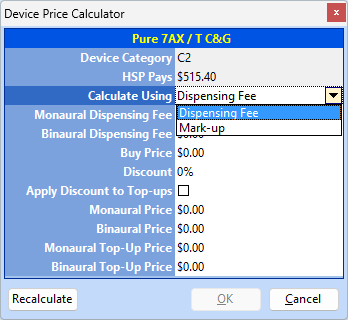
1.Using the Dispensing Fee formula, enter the dispensing fee you apply for monaural and binaural fittings; for the Mark-up formula, enter the percentage mark-up on the buy-price that you want to apply
2.Enter the Buy Price that you pay your supplier for that device
3.Enter any discount you may want to apply e.g. if you have negotiated a discounted price from the Supplier for a fully-subsidised device and you wish to pass that discount on to your private clients
4.Check the Apply Discount box if you want to apply that discount
5.Click the Recalculate button to calculate the Monaural/Binaural/Monaural Top-Up/Binaural Top-up prices
a.The Dispensing Fee formula takes the Buy Price (including any discount) for one or two devices and adds the monaural/binaural dispensing fees to reach the price e.g.
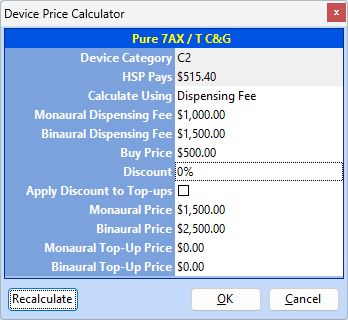
b.The Mark-up formula take the Buy Price (including any discount) and applies the percentage mark-up to arrive at a price
c.The Top_up prices use the calculated prices from (a) or (b) and subtracts the HSP device payment, so if your Buy Price is the same as the HSP payment, then the top-up amount will be $0.00